conan1
-
Posts
24 -
Joined
-
Days Won
2
conan1's Achievements






-
 conan1 reacted to a post in a topic:
Call of Duty: Modern Warfare III (2023) / Modern Warfare II (2022) / Warzone 2.0
conan1 reacted to a post in a topic:
Call of Duty: Modern Warfare III (2023) / Modern Warfare II (2022) / Warzone 2.0
-
conan1 reacted to an update:
Call of Duty: Modern Warfare III (2023) / Modern Warfare II (2022) / Warzone 2.0
-
conan1 reacted to a post in a topic:
Call of Duty: Modern Warfare II
-
conan1 reacted to a post in a topic:
3D Aim Trainer integration!
-
conan1 reacted to a post in a topic:
Call of Duty: Black Ops Cold War
-
IMPORTAND IS TO TELL THIS IW - why? we can disscus 1000 sites of what works...and what not..legacy not works in the current state of the game, All runns on Relative. so why you dont report this problem? no, anyone is here and crys about sens and the game is not fixed, thats doesnt make sense to me. report the prob, wait until the prob is fixed, than we can start discuss again. we have here a profi of you all the pimples in your face calculate on the basis of your size, he can do only so much what that game gives. We should not forget that Wizard is the mouse sense god
-
 conan1 reacted to a post in a topic:
Game request archive
conan1 reacted to a post in a topic:
Game request archive
-
thanks boss.
-
I think i found a Solution for this: Change the values in the ironsight_local.ini when the game is running. That works for me.
-
L1ttlePsych0 reacted to a post in a topic:
Call of Duty: WWII
-
Version 6.5 - Front-end changes
conan1 replied to DPI Wizard's topic in Feedback, suggestions and bugs
superb wizard^^ Distance Calculates in COD IW also not fixed, for me personally it is never important, however... example: I choose 8, but it does not stay on 8. otherwise you make a great job^^ -
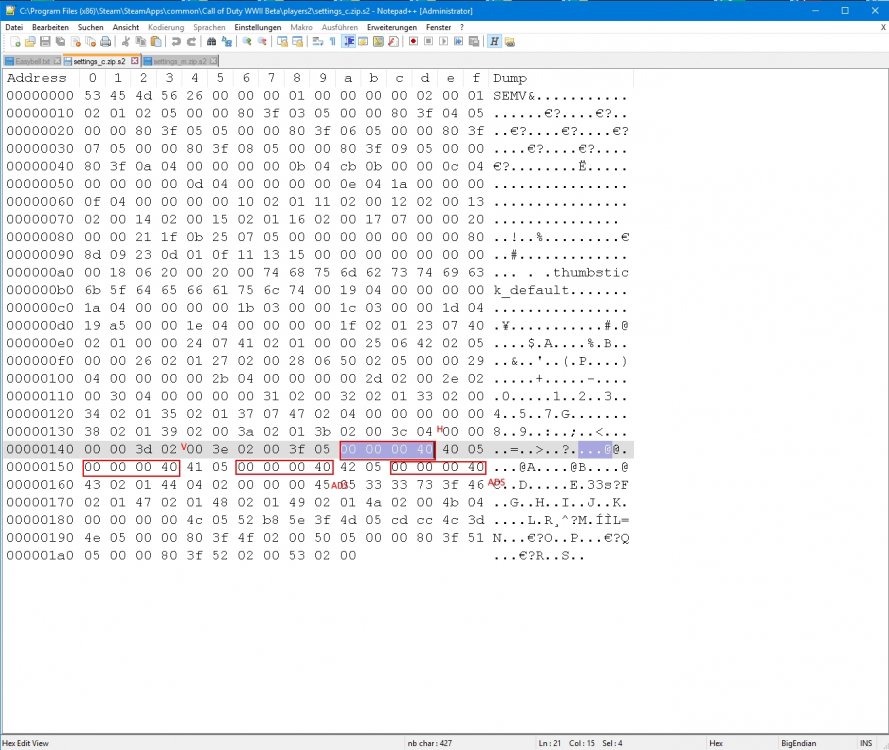
if someone has interest, here are the correct positions without clantag from the image above:
-
conan1 reacted to a post in a topic:
Call Of Duty: WW2 support?
-
Thanks Drimzi for the great support - one question - I see you have the ADS offsets also... example, i change the offsets via hex editor, must i turn on ads sens to *ON* in the ingame option menu also?
-
good job Drimzi - someone has a good hex to dez converter? - ok, this job does the calculator from wizard. I am only interested in it.
-
i restarted steam and i lowerd mem-clock from my GPU, maybe it helps you
-
FOV Slider goes up to 90, so 4:3 base. Mouse Sense Slider without numbers. Maybe someone find the right offset via Notepad-HEX-View in the config. I know, its early
-
With newer mice i would say 1000. 500 belongs to the past. Exceptions always exist in older games. It doesn't really matter. I always set maximum, and if something going wrong with mouse pointer, then I start decreasing. But as long as you have good mouse and good mousepad, that should not happen. Maybe you'd rather think about more HZ at the monitor than with your mouse. best regards
-
Feeling Hipfire is the same for me as before ... ADS is a bit too fast. Hexcode is seemingly the same on "1" (0000803f) in line 217 as usual. we wait until you're done chef OffTopic: in Advanced Warfare, my sense was 6.4 inches with 1600 dpi, when i do this in COD IW with all calculations include FOV 90/106.26 its to fast... either I am getting old or does it have something to do with the raw input (COD AW also have RAW input). i'm now on 8.5 inches with 1300 dpi FOV 106.26 (2560x1440), WIN 6/11, ingame 1. Feels good so far. The horny at * inch * is it needed no further data;) inch is inch math is so easy
-
the right lines for me are 214 and 215. can be different for everyone.
-
conan1 reacted to a post in a topic:
Call of Duty: Infinite Warfare
-
conan1 reacted to a post in a topic:
Call of Duty: Black Ops III
-
conan1 reacted to a post in a topic:
Call of Duty: Black Ops III
-
conan1 reacted to a post in a topic:
Call of Duty: Black Ops III
-
Hi Wizard, Can you tell me the exact FOV 106.26 for Black Ops 3 in the config.ini? Settings: 16:9 resolution, 6.4 inches. With the Calculator i get 1.03628, but it is too slow for me. Thanks
-
between 91~93 i think. a list with he popular FOV's form Wizard would be great. what we know so far (left is the ingame setting FOV): 65=62.9 80=78.26 100=98.97 101=99.96 120=113.68