eggpoop
-
Posts
25 -
Joined
-
Last visited
-
Days Won
2
eggpoop's Achievements






-
When using the calculator for Arsenal (Roblox) with Auto FOV enabled, the output FoV will snap to increments of 2. (Ex: Having Auto FoV as 103 hdeg res will convert to 84 FoV vdeg in the output). But in Arsenal, you can just type in your FoV, even with decimals.
-
Name: ENFORCEMENT [Early Access] Website: https://www.roblox.com/games/16406293973/ENFORCEMENT-Early-Access Status: Early Access Release date: 2/17/2024 Availability: Free
-
 eggpoop reacted to a post in a topic:
Game request archive
eggpoop reacted to a post in a topic:
Game request archive
-
 shiina_mkt reacted to a post in a topic:
Calculate cg_fovscale on older COD games
shiina_mkt reacted to a post in a topic:
Calculate cg_fovscale on older COD games
-
eggpoop reacted to a post in a topic:
Game request archive
-
 eggpoop reacted to a post in a topic:
Game request archive
eggpoop reacted to a post in a topic:
Game request archive
-
Name: Crab Champions Website: https://store.steampowered.com/app/774801/Crab_Champions/ Status: Early Access Release date: 4/1/2023 Availability: $10
-
gigo10 reacted to a post in a topic:
sens overwarch 19.5353 fornite 23.02 cm 10.1315
-

sens overwarch 19.5353 fornite 23.02 cm 10.1315
eggpoop replied to gigo10's topic in Technical Discussion
Try using this.
-
 eggpoop reacted to a post in a topic:
APEX to KovaaK's same FOV
eggpoop reacted to a post in a topic:
APEX to KovaaK's same FOV
-
Jon. reacted to a post in a topic:
Game request archive
-
Name: Michael's Zombies (Roblox) Website: https://www.roblox.com/games/8054462345/NEW-MAP-MENU-Michaels-Zombies Status: Release Release date: 11/20/2021 Availability: Free
-
The best way to convert sense from high to lower FOV?
eggpoop replied to Romero171's topic in Technical Discussion
Can you recommend something equivalent to this but converting to a higher FOV? I used this value earlier for converting to Valorant and it felt really nice -
You can change the FOV with Flawless Widescreen btw if you wanna add that to the calculator notes.
-
Solved. Changed Hipfire/Look to MDV 0% and it converted perfectly. https://www.mouse-sensitivity.com/?share=0d11290b6ced239ea3b0f1123aaf92c5
- 1 reply
-
- 1
-
-
eggpoop reacted to a post in a topic:
Can't convert to Windows / Desktop
-
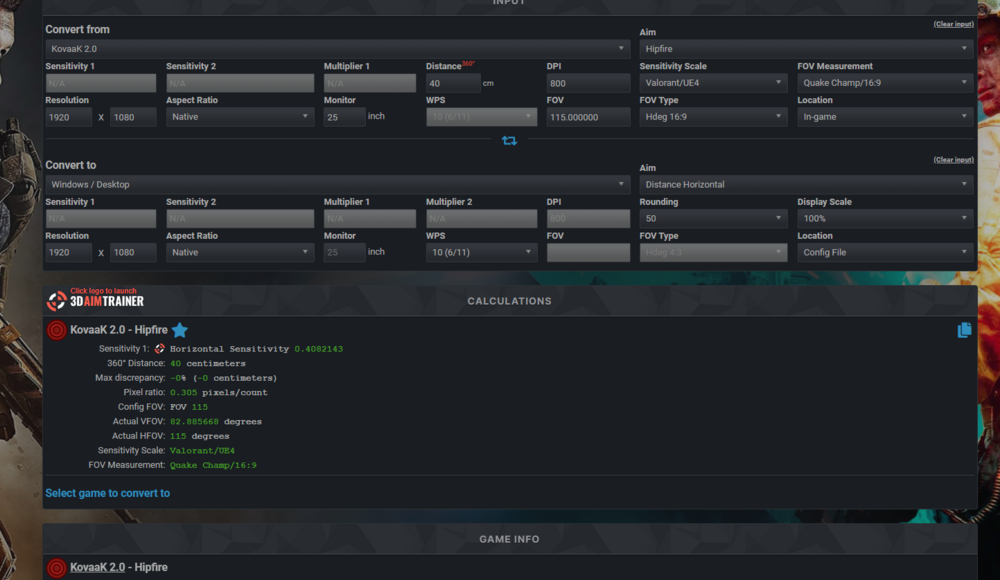
I literally just can't convert to it, every other game works and I've tried a different browser and it just wont work
-
Hi! I was curious as to how I could my calculate sensitivity using a different fovscale on Call of Duty: Black Ops. My mouse sensitivity settings are as follows: https://www.mouse-sensitivity.com/?share=04fd900f7653a256da16c9c8fcb5134a. I want to use 99.309056 FOV (4:3) on fovscale 1.3, I tried calculating on 76.3915815385 FOV but it was too fast.
-
New Year update! Favorites, reverse calculation and more!
eggpoop replied to DPI Wizard's topic in Technical Discussion
TYSM! Have a great new year and keep up the great work -
eggpoop reacted to a post in a topic:
New Year update! Favorites, reverse calculation and more!
-
eggpoop reacted to a post in a topic:
Game request archive
-
Name: Grand Theft Auto: The Trilogy - The Definitive Edition Website: https://www.rockstargames.com/GTATrilogy Status: Release/Almost Releasing Release date: November 11, 2021 Availability: Purchase
-
Toasty_ reacted to a post in a topic:
Game request archive
-
eggpoop reacted to a post in a topic:
Favorites Option
-
eggpoop reacted to a post in a topic:
Favorites Option
-
eggpoop reacted to a post in a topic:
Show sensitivity for any FOV even if FOV is locked.
-
Show sensitivity for any FOV even if FOV is locked.
eggpoop replied to eggpoop's topic in Feedback, suggestions and bugs
Alright! Well thanks a lot for the help. -
Show sensitivity for any FOV even if FOV is locked.
eggpoop replied to eggpoop's topic in Feedback, suggestions and bugs
Oh okay that makes sense. What about for Roblox games though? Like for example if you went on Randomizer on Roblox and went into thirdperson with a melee, can that give you an idea for how it changes? -
Can you add a feature for advanced mode that shows the sensitivity for the FOV you want even if the game has a locked FOV?