Captain Funsponge
-
Posts
10 -
Joined
-
Last visited
-
Days Won
1
Recent Profile Visitors
859 profile views


Captain Funsponge's Achievements






-
 Captain Funsponge reacted to a post in a topic:
Game request archive
Captain Funsponge reacted to a post in a topic:
Game request archive
-
Captain Funsponge reacted to a post in a topic:
Game request archive
-
I'm making the assumption that the calculator would output different values for Mouse Look Sensitivity and Mouse Aim Sensitivity which result in the same in-game sensitivity for both. If that's not the intention, then fair enough.
-
I'm probably doing something wrong as usual, but the aimed sensitivity is much lower than the hipfire. Is the intended functionality not to line those up together?
-
Captain Funsponge reacted to an update:
Warhammer 40,000: Darktide
-

Tom Clancy's Rainbow Six Extraction
Captain Funsponge replied to DPI Wizard's topic in Supported Games
Right OK. I was making the assumption the calculator would account for FOV settings as long as they were specified at either end. Thanks for the clarification. -
Captain Funsponge reacted to a post in a topic:
Tom Clancy's Rainbow Six Extraction
-
Tom Clancy's Rainbow Six Extraction
Captain Funsponge replied to DPI Wizard's topic in Supported Games
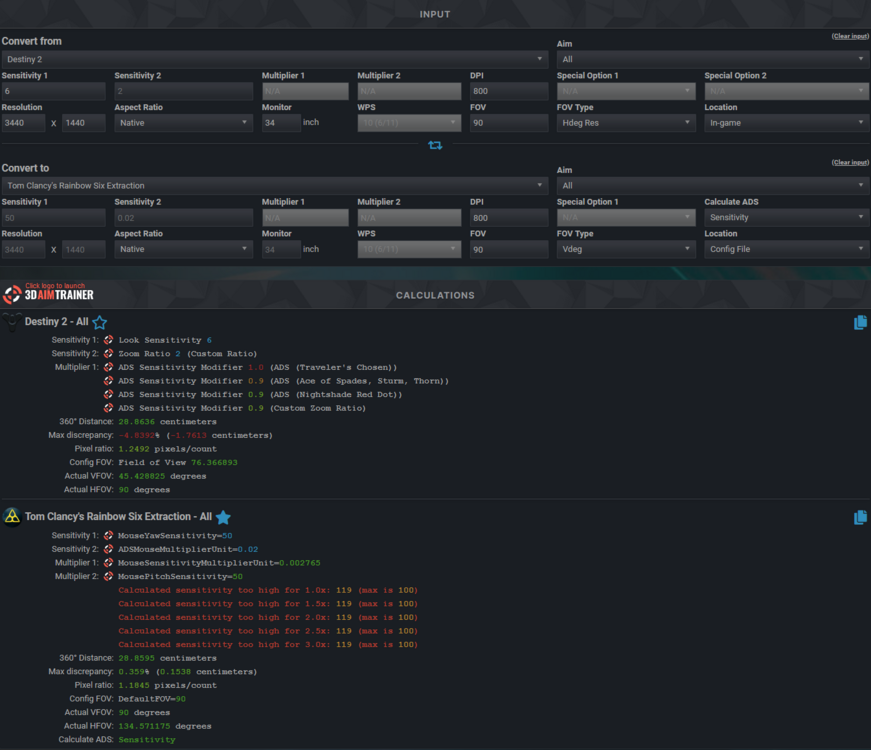
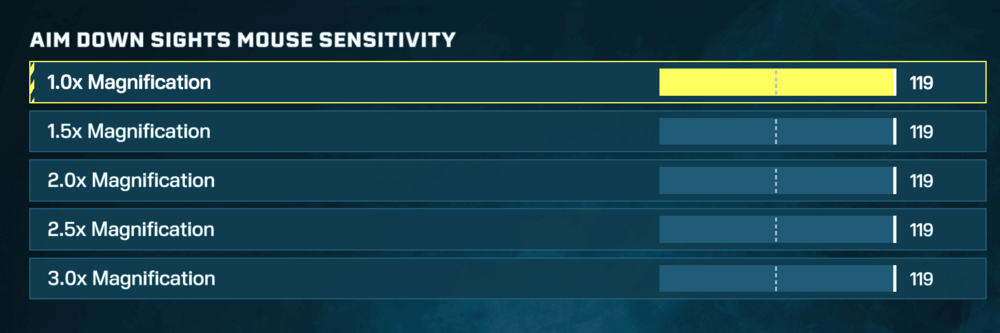
I think I need the sock puppets version of what I'm doing wrong here because I can't seem to figure it out. My goal is always to have a consistent sensitivity acoss hipfire and ADS (in this case primarily 1.0x), but I can't seem to achieve that with the numbers the calculator is providing. As a side note I can set values above 100 in the config file and they are reflected in the game menu, not positive they are having an effect above 100 though. The in-game setting with a default MouseSensitivityMultiplierUnit=0.02 suggests 7 for pitch and yaw. The config file method suggests a pitch and yaw sensitivity of 50 with MouseSensitivityMultiplierUnit=0.002765 which feels equivalent to the in-game setting as far as I can tell. With pitch/yaw set to 7 in-game and multipliers to 100 (since I can't set 119 in-game) the ADS sensitivity is still noticably higher than hipfire sensitivity. I've tried this with both the default MouseSensitivityMultiplierUnit of 0.02 and with pitch/yaw set to 50 with MouseSensitivityMultiplierUnit=0.002765. ADSMouseMultiplierUnit is also set to the default 0.020000. Any idea what I'm doing wrong here? Edit: With some very imprecise testing, the ADS multipliers which seems closest to the pitch/yaw 50, MouseSensitivityMultiplierUnit=0.002765 is around 60 if that helps.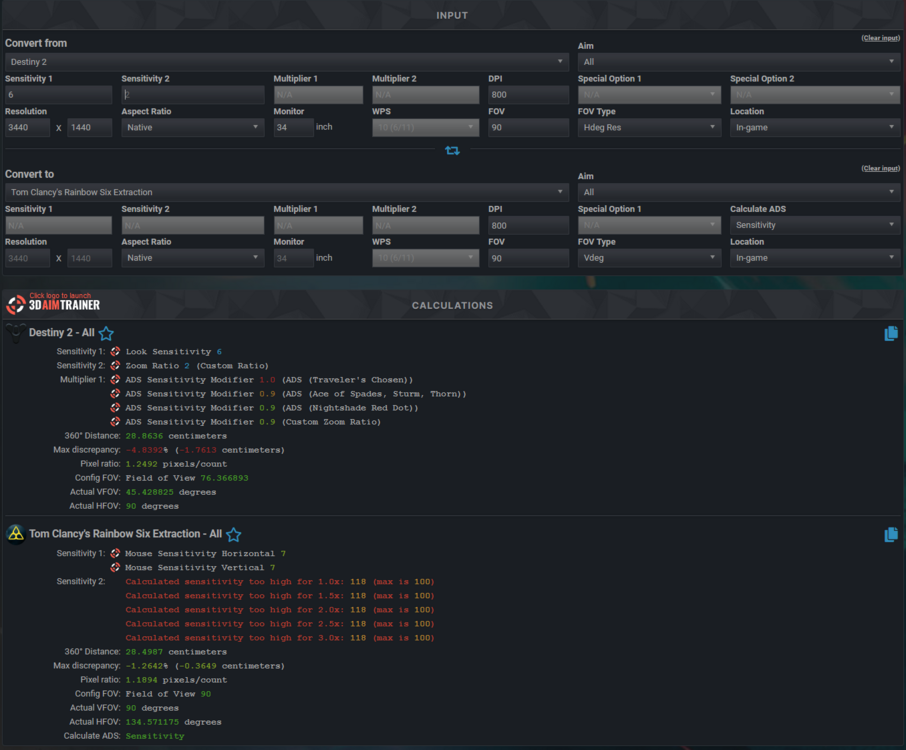
-
Game request archive
Captain Funsponge replied to DPI Wizard's topic in Feedback, suggestions and bugs
The Anacrusis is also now available on gamepass. -
Captain Funsponge reacted to a post in a topic:
Game request archive
-
Captain Funsponge reacted to a post in a topic:
Game request archive
-
Captain Funsponge reacted to a post in a topic:
Game request archive
-
ProuDBeasT reacted to a post in a topic:
Anthem
-
There's also FOV support now, would be wonderful if you could take a look.
-
 Captain Funsponge reacted to a post in a topic:
Anthem
Captain Funsponge reacted to a post in a topic:
Anthem
-
Ah I see, I'll give that a try. Thanks.
-
Setting GstInput.MouseSensitivity to 1 is super slow though, how are you counteracting that? Increasing DPI/CPI on your mouse?
-
Apparently, to disable acceleration you need to set something other than "bEnableMouseSmoothing": bViewAccelerationEnabled=FALSE There's also ZoomedSensitivityScale, but not sure what that should be to make ADS 1:1. 0.8 seems about right.