sc0zz
-
Posts
45 -
Joined
-
Last visited
Recent Profile Visitors
1,208 profile views


sc0zz's Achievements






-
btw @DPI Wizard there are a few weapons missing from the calculator. Some that were added in later patches. Kyubi and Nue, for example .. but others I noticed too, that I can't recall right now. Just in case you didn't know.
-
 sc0zz reacted to a post in a topic:
Cyberpunk 2077
sc0zz reacted to a post in a topic:
Cyberpunk 2077
-
Gotcha, OK. It's close enough that if I pick up a new weapon, I don't immediately have to quit game and go into the config, so it's not an issue really. Just curious. Probably could have given it a bit more thought before asking Thanks for the fast answers.
-
@DPI Wizard but surely the calculator should still return 1.6 or 1.65 for the zoom in game since that's what the game sets note, the only thing I'm changing is the in game / config drop down on the calculator
-
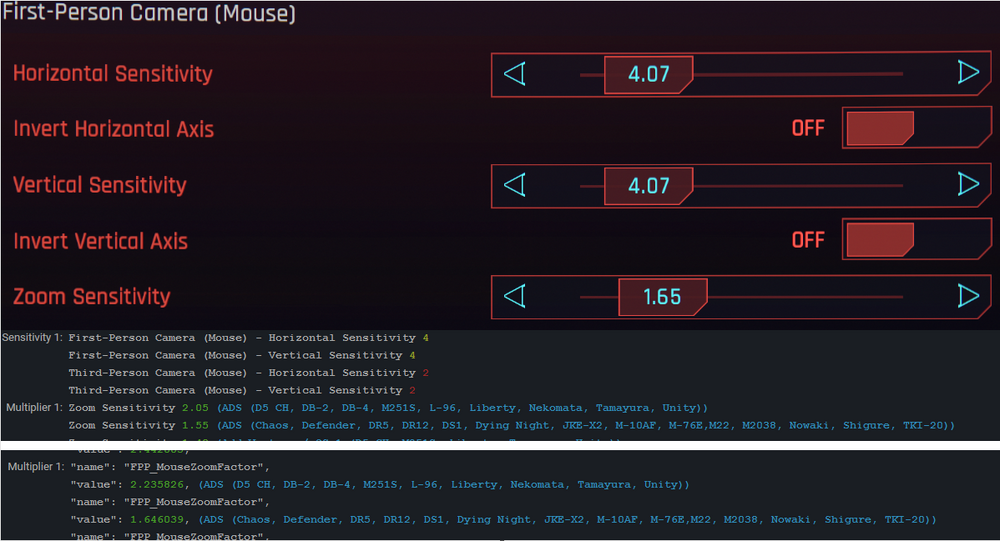
Hi @DPI Wizard Can you explain why, for zoom sensitivity, a config value of say 1.646039 translates to an in game value of 1.55 in the calculator but in game the config value gets rounded up to 1.65? Is there a reason for that or is it a calculator error? Cheers.
-
Ah, that makes sense. I was leaving zoomsensitivityall at 1 and changing every scope sense to 0.888877, which was a bit of a pain but is what the default calcuator results showed. This'll make things easier to tweak if I change fovs - thanks for the help
-
sc0zz reacted to a post in a topic:
Battlefield 2042
-
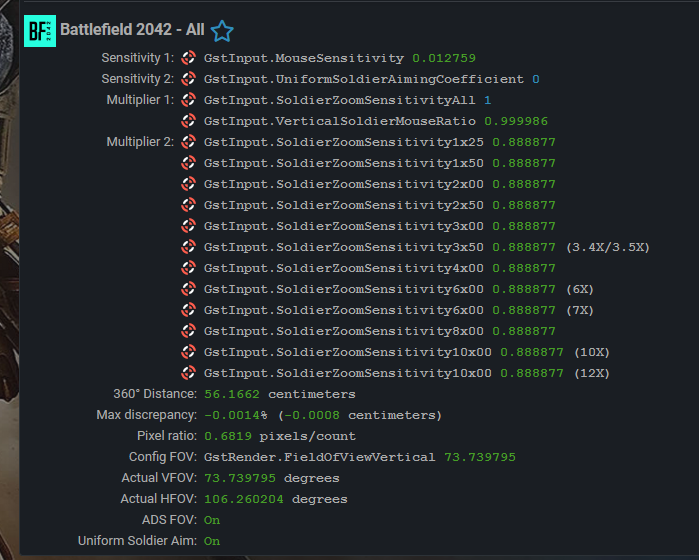
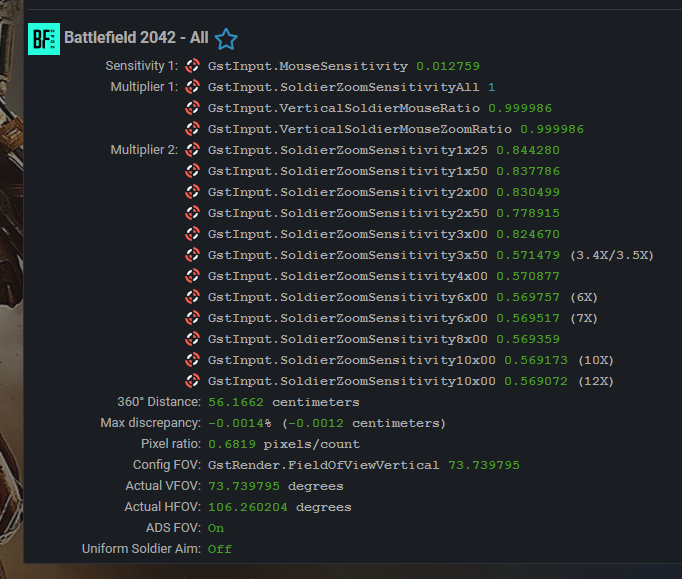
Hi @DPI Wizard what should I be setting the coefficient to, to get my zoom sens feeling like Siege (ADS fov aside) - I assume zero but I'm not sure which settings correspond for each game? Also I've seen someone set their coefficient at zero but then all their zoom sensitivities set to 1. I assume they have tailored their fov and/or sens so they can just leave them all at 1 and that I shouldn't be doing that and I should be inputting the value that the calc gives me? Lastly, would the results for USA on be the same as USA off but with the different sens's for each scope - comparing below. There's a minute amount more discrepency. Are there any impactful downsides to either way?
-
Game now has updated FOV slider with expanded values. Steam deck is good for something. There is also raw input option in mouse settings - dunno if that's always been there.
-
 sc0zz reacted to a post in a topic:
Monitor Distance - Dynamic is now live!
sc0zz reacted to a post in a topic:
Monitor Distance - Dynamic is now live!
-
Thank you for taking the time. Can I ask why the special guns aren't listed? The gold quality unique guns. There's a couple with scopes that it would be nice to have the calculations for.
-
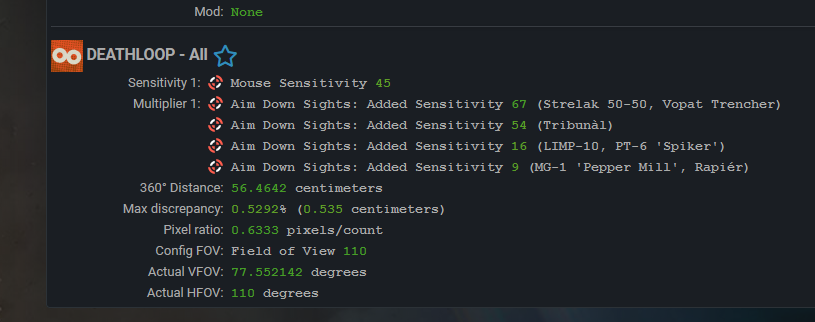
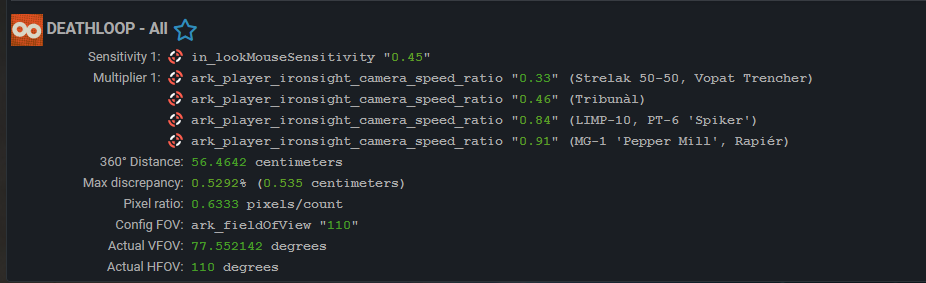
@DPI Wizard These settings appear to be a bit off. So for instance the LIMP-10 using in game option returns a value of 16 but the config file option returns a value of 0.84. The problem is 0.84 in game is 84 not 16 and then to further confuse, 84 is too fast and 16 is too slow. Something's off. Can you check them please? Plus in the config file the value is ark_player_ironsight_camera_speed_ratio_mouse - might you have confused the controller values?
-
sc0zz reacted to a post in a topic:
Gunfire Reborn
-
I need the widest FOV in this game than any other game for some reason. It is fun, and challenging at harder levels. 178 hours and I've yet to touch the co-op, so y'know hit me up if you ever want to try that @DPI Wizard Oh, by the way, I forgot to mention, there is a scroll (or upgrade) that increases zoom levels by x2 so I think the max is x7 - I will never use that but someone might.
-
Great work as usual - gonna try them out now. Thanks.
-
sc0zz reacted to a post in a topic:
Gunfire Reborn
-
Hi @DPI Wizard This game recently added the ability to adjust the zoom levels of scoped weapons. I think it's between 3x and 5x from my recent playthrough. Perhaps you could include this somehow, or maybe just the min, max and default values. No biggy, it's not actually that important, or useful ... but if it's a straightforward task, it may be worth taking a look.
-
sc0zz reacted to a post in a topic:
S.T.A.L.K.E.R.: Clear Sky
-
Hi @DPI Wizard. There is a way to adjust the mouse sens range for Clear Sky, so that there is a lower limit. This means you can use a lower sens without having to lower your mouse cpi / dpi. The post from Mongoose in this thread gives instructions that I followed with some success. However, I would prefer to be able to dial it in even more accurately. The sens I get using the calculator is 0.0355. The hex fix lowers the range to 0.01 I believe, so three ticks should put me at 0.03, which is much better but not spot on, so if you have any ideas based on this method, please let me know. There is another link in that thread to a similar technique for Shadow of Chernobyl, which may be of some use too. All the best.
-
sc0zz reacted to a post in a topic:
Halo Infinite
-
Hi - this post reckons the commando is 2x zoom but is listed under 2.5x in the settings - can you check the calculation applies for it? - thanks so much for all your hard work. Also, some FOVs do not stick - so for example 114 should provide the best consistency for me between hip and ads but if I set that and navigate away and back, the game has set it to 113. Same for 110 - it gets set to 109 - unless I edit the config found in %appdata% local Haloinfinite, then it seems to stick.
-
Yea, it does. Which I knew, so I don't know what I was even asking . Thanks anyway. Wierd game - loads of discrepencies - minimised by setting in game fov to max though.