


Nameless
-
Posts
81 -
Joined
-
Last visited
Nameless's Achievements






-

Conversion method guide. (and other FAQ's)
Nameless replied to Skidushe's topic in Technical Discussion
But if you always keep the same resolution then you won't get a different result from mdv or mdh, right? -
 AIucardd reacted to a post in a topic:
Conversion method guide. (and other FAQ's)
AIucardd reacted to a post in a topic:
Conversion method guide. (and other FAQ's)
-
AIucardd reacted to a post in a topic:
Conversion method guide. (and other FAQ's)
-
Conversion method guide. (and other FAQ's)
Nameless replied to Skidushe's topic in Technical Discussion
Well, if aspect ratio doesn't change the sens, then you can use either mdv or mdh no? I tried both a few times and i always get the same result. -
Conversion method guide. (and other FAQ's)
Nameless replied to Skidushe's topic in Technical Discussion
Dont worry, me neither. But yes if you can use the same fov its the best. Because with same fov you will ave the same sens + same 360. Thats why your flicks feel off with a different fov. Because you end up using the same sens at a diff 360 when fov is different. -
Conversion method guide. (and other FAQ's)
Nameless replied to Skidushe's topic in Technical Discussion
Yes i guess you should. Idk that Kovaak aim trainer app but i guess you going to ave to choose between training using your Tarkov movement sens or Tarkov ads sens, since training game doesn't usually ave an independent ads sens. Do you ave a different sens for movement and ads at Tarkov? -
schubi reacted to a post in a topic:
Conversion method guide. (and other FAQ's)
-
Conversion method guide. (and other FAQ's)
Nameless replied to Skidushe's topic in Technical Discussion
You ave to choose really! -
 schubi reacted to a post in a topic:
Conversion method guide. (and other FAQ's)
schubi reacted to a post in a topic:
Conversion method guide. (and other FAQ's)
-
Conversion method guide. (and other FAQ's)
Nameless replied to Skidushe's topic in Technical Discussion
Then, should he be using MHD for conversion or MVD? -
Conversion method guide. (and other FAQ's)
Nameless replied to Skidushe's topic in Technical Discussion
U mean if the resolution is different? right? -
schubi reacted to a post in a topic:
Conversion method guide. (and other FAQ's)
-
Conversion method guide. (and other FAQ's)
Nameless replied to Skidushe's topic in Technical Discussion
I dont think it matter as long as you input your old and new resolution in the calculator. I usually use MHD% then i double check with MVD% -
Conversion method guide. (and other FAQ's)
Nameless replied to Skidushe's topic in Technical Discussion
In Apex, is it the same sens when you are using 1 multiplier or is it scaled? -
Conversion method guide. (and other FAQ's)
Nameless replied to Skidushe's topic in Technical Discussion
I think its normal that you don't get the same 360 distance result between both conversion methods since the vertical distance wont be the same as horizontal unless your monitor is in a perfect square. What matter is that you get the same result for hipfire and zoom sens with both method (0%MDH & 0% MDV). Now for the mousesensitivityMultiplierUnit i'm not quite sure what this is. But you can make some check by selecting different aim option to see what is what. And you get a tiny difference in distances between csgo and rb6 because that its the closest that the game set it. -
Conversion method guide. (and other FAQ's)
Nameless replied to Skidushe's topic in Technical Discussion
Yes you are right, i'm using 16:9 widescreen in 1920x1080. Should i then select hdreg 16:9? -
Conversion method guide. (and other FAQ's)
Nameless replied to Skidushe's topic in Technical Discussion
no i didnt but its the default ratio found by the converter. Should i change it? to what since i'm using 1920x1080 in every games? -
Conversion method guide. (and other FAQ's)
Nameless replied to Skidushe's topic in Technical Discussion
But if you don't want to bother understanding how this system work's and just want a simple answer to what best for "muscle memory" then: You go for 0%MDH for everything. -
Conversion method guide. (and other FAQ's)
Nameless replied to Skidushe's topic in Technical Discussion
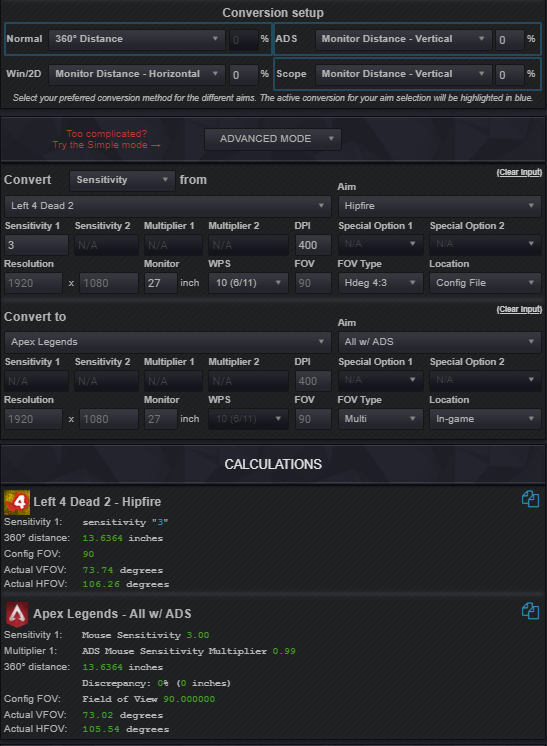
Even if you can set the same fov; you use 0%MDH . The reason why you want to check both methods (0%MDH & 360Distance) is that if both game use the same scaling method then you will get the exact same result for both conversion method (0%MDH & 360Distance) but if not there should be a small difference when using the 360 distance conversion method, like you can see in those pics, if i'm not mistaking. I'm using the exact same fov/ same sens and this is the result that i get. And for scope you do the same.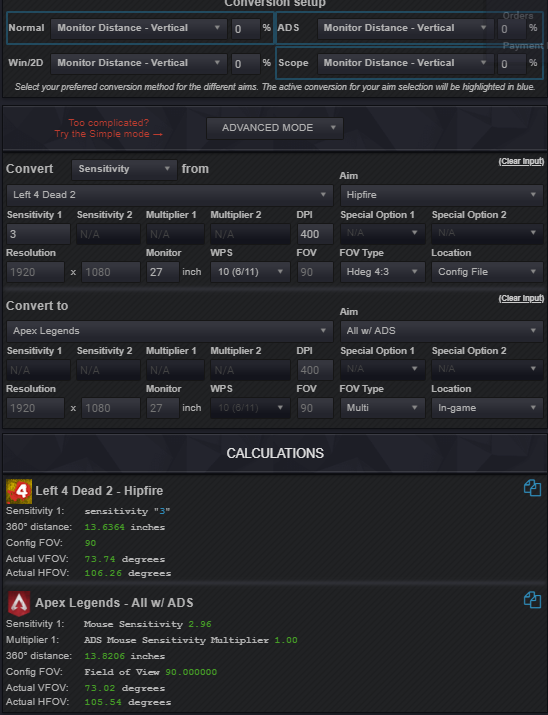
-
Conversion method guide. (and other FAQ's)
Nameless replied to Skidushe's topic in Technical Discussion
Yes, if you can adjust the fov. But maybe not for scope since games doesn't necessary use the same scaling method for ads sens and for scope sens. For example if i'm not mistaking csgo players struggle's with Apex because Apex doesn't use the same scaling method for scope as csgo. Which mean's that they cannot just use the same fov which is 90 in csgo by default to convert their scope sens. They ave to choose between 360 distance or 0%mdh for scope conversion. But for your hipfire conversion, you can use 360 distance if the fov is the same from one game to another for a 100% accurate conversion but i would double check with 0%mdh just to be sure.