

KODa
-
Posts
34 -
Joined
-
Last visited
-
Days Won
1
Recent Profile Visitors
1,654 profile views



KODa's Achievements






-
 TheNoobPolice reacted to a post in a topic:
Dealing with mouse drifting while in motion, at wits end.
TheNoobPolice reacted to a post in a topic:
Dealing with mouse drifting while in motion, at wits end.
-

Dealing with mouse drifting while in motion, at wits end.
KODa replied to sqwash's topic in Off Topic Discussion
You're correct. It's just that some people miss the human factor in it and others deny modern sensors having any drift, so I guess I was just covering the possibility. -
Dealing with mouse drifting while in motion, at wits end.
KODa replied to sqwash's topic in Off Topic Discussion
Windows 10, Logitech G Pro Superlight in wireless mode, 1000hz, 800dpi. BTW the cursor drifting upwards or downwards when making side to side motions is how you grip your mouse, if you keep doing perfectly horizontal lines, it wont drift up or down, but we humans tend to make small circular motions and this causes the drift, at least when talking purely left-right motions.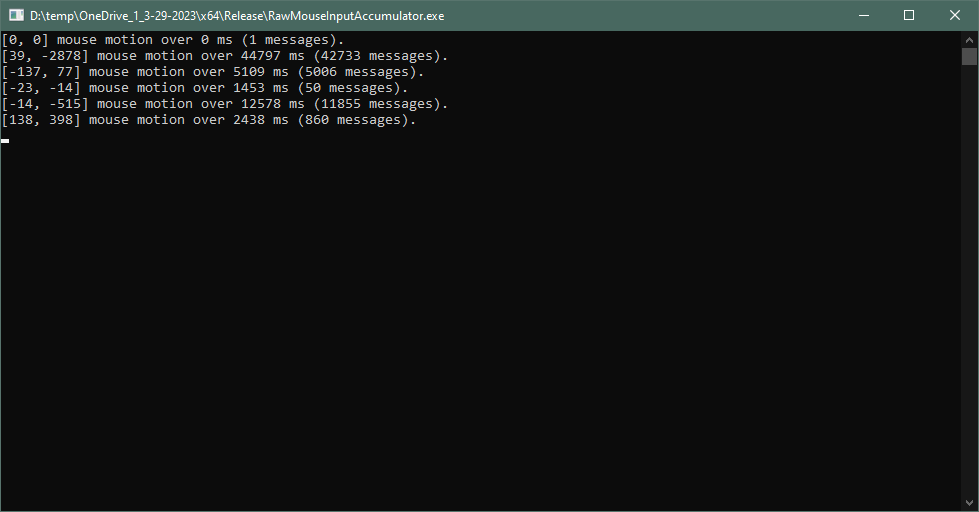
-
Dealing with mouse drifting while in motion, at wits end.
KODa replied to sqwash's topic in Off Topic Discussion
Mind sharing the app you use to test this? -
Alright, thank you!
-
Are we sure the Polygon calculator is up to date? It seems to give wrong results for me at least at 360/cm department and in-game ADS sensitivity calculation fails always saying the value is outside of the limits.
-
Is this game even alive? The steam page looks really barren. Maybe I'm looking at a wrong one?
-
KODa reacted to a post in a topic:
Valorant Scope sens. to MDV/MDH?
-
KODa reacted to a post in a topic:
Recommended method to convert 4:3 stretched to 16:9 native in CS:GO?
-
Recommended method to convert 4:3 stretched to 16:9 native in CS:GO?
KODa replied to mevlin's topic in Technical Discussion
Yes, meaning not changing the sensitivity at all when changing between 4:3 and 16:9, that's how I've been doing personally. It gets messy real fast if you start switching sensitivities with aspect ratios. Sorry for super late reply, btw. -
mevlin reacted to a post in a topic:
Recommended method to convert 4:3 stretched to 16:9 native in CS:GO?
-
Cannon reacted to a post in a topic:
Recommended method to convert 4:3 stretched to 16:9 native in CS:GO?
-
Recommended method to convert 4:3 stretched to 16:9 native in CS:GO?
KODa replied to mevlin's topic in Technical Discussion
Personally I would just keep the same sense and be done with it. -
SpunkyWhiteDog reacted to a post in a topic:
Ready or Not
-
I would assume it's the sensitivity for the freelook you get while holding left Alt
-
SpunkyWhiteDog reacted to a post in a topic:
Ready or Not
-
KODa reacted to a post in a topic:
Ready or Not
-
Why not options for config file? It's available in the folder Spunky pointed above.
-
 Springfield1903 reacted to a post in a topic:
Low Zoom sens too high, High Zoom sens too low.
Springfield1903 reacted to a post in a topic:
Low Zoom sens too high, High Zoom sens too low.
-
...Great. "We are gonna make a first person shooter game and not include good sensitivity options, because they're not important anyway, right?"
-
Wait, there's no sensitivity setting in-game? WTF?
-
@DPI Wizard Thank you. I knew I could count on you.
-
Low Zoom sens too high, High Zoom sens too low.
KODa replied to REYOU's topic in Technical Discussion
Try MDH 100%, MDV 133.334% or MDV 100%. These are the most common ones, which you've been accustomed into if you have played without changing the ADS multiplier in first person shooters. It's mainly these and 0% that developers choose for their games. -
@DPI Wizard Would it be possible to have sensitivities for vehicles also? You can tune it with that "Vehicle view mode" multiplier, as you most certainly know already.