

fortunate reee
-
Posts
1,173 -
Joined
-
Last visited
-
Days Won
39
6 Followers



Recent Profile Visitors
4,034 profile views





fortunate reee's Achievements






-
 Aves reacted to a post in a topic:
What do the "max discrepancy" numbers actually mean?
Aves reacted to a post in a topic:
What do the "max discrepancy" numbers actually mean?
-
DPI Wizard reacted to a post in a topic:
PAYDAY 3
-
bingo its 5 guards + 1 camera operator so you ca stealth it for free
-
you can do this in stealth by taking out all 5 outer guards and leaving the camera operator alive, the 5th pager will trigger a search which is fine since there are no more guards able to find you you can also shoot all the cameras so the operator wont be able to see you on hard and normal difficulty either isa fine this is a matter of 10- 15 mins for a quick run without the extra loot actually fgreat method you only reallly need to go in and out of the end zone for 2- 5 mins
-
DPI Wizard reacted to a post in a topic:
PAYDAY 3
-
for classes equip the first tier of as many as you can equip then go for the public "road rage" heist on hard (2nd difficulty) its a safe bet to get decent exp and solid money for leveling and buying things if you want to solo do dirty ice on normal and jsut run in either stealth it partially or jsut go loud instant grab all the front showroom diamonds and do a loud exit
-
fortunate reee reacted to a post in a topic:
What is your Opinion on 1:1 ADS to Hipfire Sensitivity?
-
 Kush reacted to a post in a topic:
FOV Types between Games
Kush reacted to a post in a topic:
FOV Types between Games
-
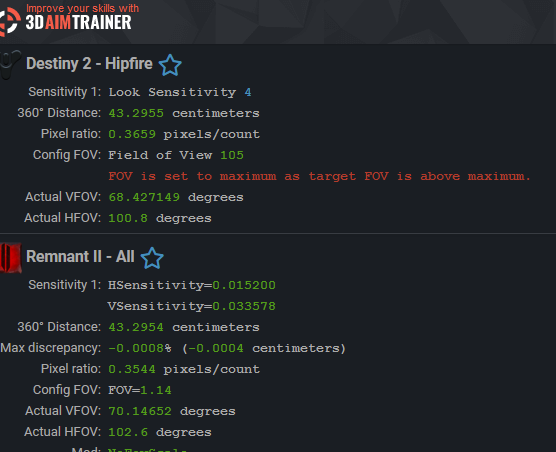
you dont have to or should mess with the respective fov type that jsut tells you HOW a game calculates their fov or how their settings apply the fov number changing the fov type in the calculator won`t change how that game functions ! ------- if you want to match fov across games you can (easy mode) use the auto fov and enter your base games settings (screengrab 1) and then just let the calculator show you the values you need to enter in the game you want to use or manually match(hard mode/mostly unnecesasary ) by matching fov 1 to fov 2 by hand either through trial and error -------------- if you actually use the same resolution and aspect ratio using in all the games matching the fov wont be much of an issue unless one of yopur games has a smaller maximum fov limit. in which case it would look somewhat like this and actually give you an error (screengrab 2) there is a way to work around that issue but as far as i am concerned that would make this needlessly complicated TLDR: use "auto fov" (screengrab 1) on the top right of the calculator

-
-
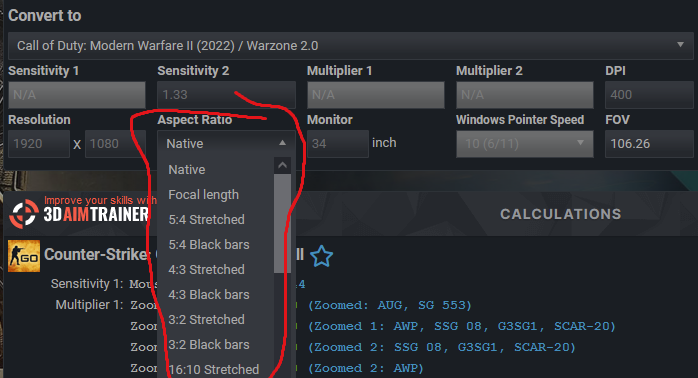
 you dont have to calculate in this way unless you have soemthign special you are trying to achieve. this would be the default you wann start with for csgo https://www.mouse-sensitivity.com/?share=3fd1808afd4677d69a2661f5d7f159fd maybe change your resolution and aspect ratio to fit your setup if you then want to match csgo to other games you simply add them in the 2nd slot https://www.mouse-sensitivity.com/?share=a9adf0204e031b713ff8868c879e7f13 like this ^ and you should be all done. if you are usign stretched resolution or aspect stuff this will be the spot you shoud edit. if you are having specific issues dont hesitate to Ask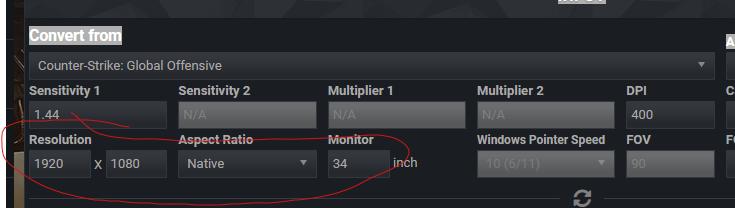
-
-
not recommendable given the substancial difference in fov between 103(max valorant) and 120("90" in siege)
-
with past ubisoft title you were able to set it to write protect worth a try imo
-
if you are using usa 0 you are set to go with default ads in apex and siege since both either always had 0% as their default or have adapted to it recently so 50 ads in siege and 1.0 in apex should hit the mark ( the reason the site shows you 0.999... is because of a roundign error apex hasnt adressed in ages so if you want the most accurate option you can simply modifiy the settings. -- if the calculator is too complicated id suggest setting both games to "in game" this will this will reduce the amount of numbers sicne you habe less options at the cost of accuracy --- if you want a similar feel as well as distance while matching id suggest using the same fov across games auto fov ( top right corner of the calculator ) works great sicne you wont hagve to worry about fov type. --- func fact : if you use the "share" button (purple) others can easiely help you by makign changes or sendign you a improved link to your conversion
-
Can PW3395 Sensors handle 3200dpi+ with no smoothing?
fortunate reee replied to falley's topic in Technical Discussion
tbf might be a hard pill to swallow initially but no amount of minor smoothing will change anything about your gameplay, pick cpi & polling rate value you feel good at then stick to it unless the next game you play requires a different sens most newer sensor should run fine and i had no issues with my x2 while trying 3200 + cpi although my system simply doestn do stable 1000hz polling so i tend to stick to 800 & 500 which works like a charm for my system and usecase at 1080p -
fortunate reee reacted to a post in a topic:
Considering changing our website URL from mouse-sensitivity.com to mousens.com
-
zhou707377543 reacted to a post in a topic:
What formula is the scope factor based on, and why is the coefficient different in CSGO and Call of Duty。
-
apex default is mdh / mdv 0% in cod & battelfield you can set the coefficient and use either 1,778 , 1,333, mdv or 0% mdv /mdh csgo uses 1,333 mdv as its default since that correlattes to the aspect ration of 4:3 which used to be the native screen ration when counterstrike was initially programmed and the devs wanted to increase the perceived uniformity across zoom levels.another example for said behavior is destiny two which has a similar background given that it uses 1,778 mdv as its native for a similar reason jsut with 1 simple change the native aspect ratio these days being 16:9. Both of these just make an arbitrary point on the edge of the screen feel similar giving one the perceptinon of uniformity 0% has a different approach id suggest you go look at the insrtructions if they are available in your native language, the videos are great examples for the different types of match
-
360 vs vertical/horizontal matching
fortunate reee replied to GoncasN's topic in Technical Discussion
i think there are a couple of nice videos in the isntructions that show the differences between all of the options, however the reason why many prefere 360 distance for hipfire isnt accuracy or feel since those arent ideal especially when different hipfire fov are used. it seems to be mostly for the sake of having a similar perception of movement or navigation usage in game ( so "imma flick the exact pointwhere that guy is" but oh so that right hand turn will be done with this movement no matter the fov) for scopes however with the vast differences in fov / zoom it makes no sense to use 360 distance since the vast majority of them will fee horrendus and inconsistent when using 360 dist and youd isnetadopt for a mathematically sound solution like focal lemngth scaling ( 0% mdv / mdh they are msotly the same when you dotn emss with the values or aspect ratios involved ) as for the difference in feeling between thos two games you mentioned id suggest trying the same fov with the same 360 distance on hipfire or using alternatively you could try somethign like this and use black bars in the game with the tiny fov to simulate a larger fov https://www.mouse-sensitivity.com/?share=2014b18a483d2da82616020f51db14ed
-
360 degree rotation does not match the length of the mouse pad.
fortunate reee replied to ASPIIDD's topic in Hardware
! if your sensor gives you a sens that is "too high " you ca simply set this program (or raw accel) to a flat line and calculate the sens multiplier in this case this would multiply the input by 0.7 and thus make the input sower pretty much the easiest way to correct for dpi deviation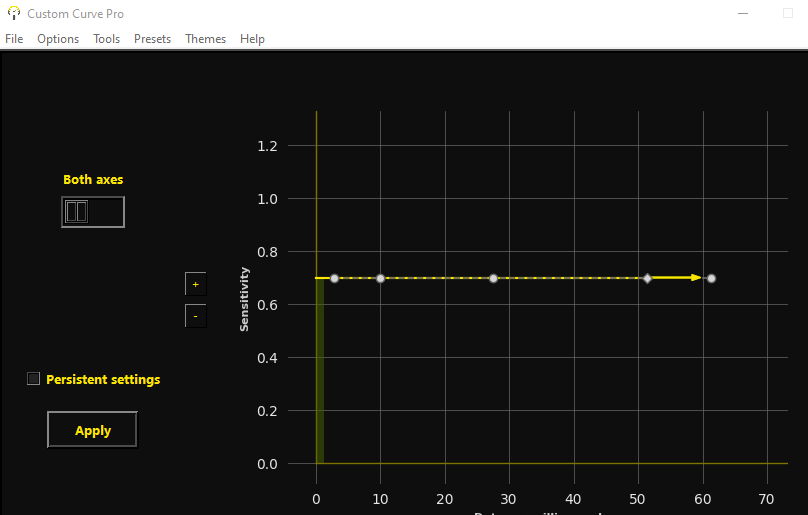
-
360 degree rotation does not match the length of the mouse pad.
fortunate reee replied to ASPIIDD's topic in Hardware
friends mouse vs your mouse vs my mouse all 400 dpi 2 in game = 3 results in 360 deg ( more or less accurate)