ClanZes
-
Posts
9 -
Joined
-
Last visited
Recent Profile Visitors
986 profile views


ClanZes's Achievements






-
Hello, I would like to know if there is any way to perform some test on the polling rate. Testing a little in the shooting range I noticed that 500hz seemed to work better
-
I had already tried something similar to what you are trying to do. But I ended up giving up, I couldn't make it work but I had the files saved I hope it helps you. It's like I said before, I'm using the horizontal measurement of my monitor (24 inch - 20.92 inch hor) or the horizontal measurement of my pad (only when I use a small one below 32 cm). That way at least I've noticed a better average between the games
-
147323000403200315.pdf ptj0837.pdf
-
I have another opinion on this. I believe that aiming with the mouse is similar to drawing, something similar to a digital drawing with a graphics tablet. Looking at the general average sensitivity of professional gamers finding a value close to the general size of wide mousepads (40 - 48cm), slightly higher sensitivities reaching 50cm+ can be explained by the dpi deviation. So I thought of something that has worked for me in a lot of games and I've managed to maintain consistency, I used the MouseTester software and simply tracked the mouse from end to end when points were generated and converted it to a sensitivity (https://www.mouse-sensitivity .com/?share=e8678384c65dbc25506e5149f86b5d73).
-
Windows sensitivity affects in game aiming if you match!!!
ClanZes replied to Pyroxia's topic in Technical Discussion
Hello sorry for my English, I spent a year thinking about "how to find your ideal sensi". I ended up in this period reading some articles about the movement of the wrist, in short you find something close to 75 °. But I couldn't "convert" that angle and distance, until I thought of a simple idea, convert it to pixels. I do not know if what I thought is right then I would like your opinion on the matter. I put the resolution of my work area 1920x1080 and did the same with the blank area in paint, on the website I converted this way https://www.mouse-sensitivity.com/?share=2d0c0f7c8b444c574292201b2fef8556 (1920 pixels = 20 "). In paint I made the movement of the wrist from radial to ulnar (from left to right, trying to get the maximum amplitude), I found something close to 750 pixels, converting something close to 20 cm, after that I converted mdh 0% for all games https://www.mouse-sensitivity.com/?share=c3b980b11f447a3f6f63bcdda0be7931 After that I felt my performance increased between games. I have quick movements in games that use a higher fov and accuracy in games like cs and valorant that use a smaller fov. -
 ClanZes reacted to a post in a topic:
Possible method of conversion between FOVs
ClanZes reacted to a post in a topic:
Possible method of conversion between FOVs
-
Possible method of conversion between FOVs
ClanZes replied to ClanZes's topic in Technical Discussion
Thank you for the return and the message of solidarity. I have been in some way trying to replicate what these two articles demonstrate https://journals.sagepub.com/doi/pdf/10.1177/147323000403200315, on the movement with the wrist I agree that it can cause huge problems with the individual's health Normal_Ranges_of_Ulnar_and_Radial_Deviation_with_R.pdf -
Hello my name is Felipe, I am about 1 year testing all methods available on the site. Currently I have started to test about wrist movement and the average that an individual can do. After some research I found an average (The sum of the movement to the right and left) would be between 15.358 cm to 17.8cm (15.358cm / 16.80cm / 17.00cm / 17.20cm / 17.80cm) but when that is transferred to the game as the smaller the fov more difficult to get right as many already know. So I thought about converting the same measure that I use as accurately as possible for the desktop and then converting to games using the MDH 0% method and to my surprise it has worked very well! Sorry for my English, I'm Brazilian and I still don't master English well. https://www.mouse-sensitivity.com/?share=184950ee6566195b8759f28c8e67991f - for Discrepancy https://www.mouse-sensitivity.com/?share=4a110517c9c044081b2c7466338cc67f - for 3D
-
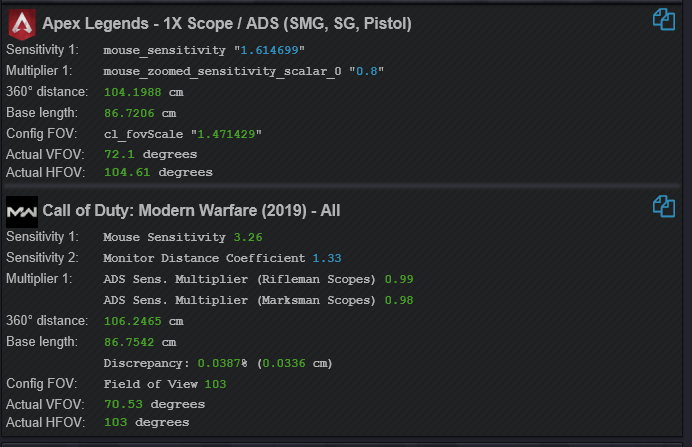
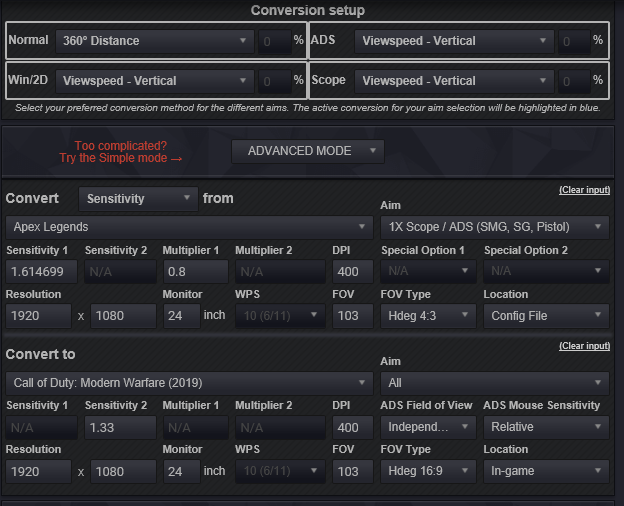
I would like to leave the Hipfire (360 º) and the MW ADS (2019) equal or the closest to Apex Legends, that was the closest I could leave, all right, someone could help me.
-
ClanZes reacted to a post in a topic:
Game request archive
-
someone can corvert 43.5005 Hip fire ands ADS MDV 0%